Posts

Showing posts with the label PrusaSlicer

How To Use Pre-Supported .3mf Files

Image
As I've written about a few times, I've been using PrusaSlicer's SLA tree supports for my FDM prints ... and while it's not perfect, I'm happy enough with the workflow that I haven't wanted to change it!  One of my favorite aspects of using PrusaSlicer's tree supports is that I can design them, then save the supported .3mf file, and then other people can open that file and tweak the trees.  That's really important because different printers have different capabilities, and when you size a support tree to work with a 0.25 mm nozzle, it's not always going to provide adequate support for a 0.4 mm nozzle print (and won't take advantage of the smaller interfaces you could get from a 0.15 mm nozzle!).  The .3mf format allows people to tweak those settings for themselves, while using the same basic support design! This adaptability means that I can share my pre-supported .3mf files with my patrons, and there's a reasonable chance that they'll be...

Support Head Diameter in PrusaSlicer

Image
Hi everyone, this is going to be a short and quick post.  As you've seen, I've been playing around with support trees in .3mf files.  Specifically, I've been using them as a solution to design a set of supports that will work for anything from SLA printers to FDM printers with a .4 mm nozzle, and I feel like I've made a lot of progress! I learned something new this morning though, which is important to be aware of when changing from FDM to SLA settings (or the other way).  While most details of the support tree settings (diameter, angle, etc.) are respected when you regenerate trees, the actual Support Head Diameter setting is not.  This setting is not changed because PrusaSlicer stores that value per support head, which gives you a ton of ability to fine-tune supports by shrinking or growing individual heads as needed... but it does make it a little more difficult to take a .3MF file that was designed with FDM support trees and change it over to work with SLA supp...

Tweaking Support Pads for FDM Printing

Image
When running an SLA print, the standard practice is to use a Pad, which is basically a few solid layers of very well cured resin, then have the model suspended above it on trees.  This solid pad helps ensure bed adhesion, and probably does some other important functions that I haven't even considered... but we don't necessarily need it if we're doing an FDM print.  In fact, if our model has a flat bottom, it can be really nice to have it directly on the print bed instead of floating above it! Fortunately, we can tweak the support pad in order to behave in exactly this way!  The first thing that you'll want to do is open PrusaSlicer (with an SLA printer selected), then go to Print Settings  tab and open the Pad  section.  Start out by enabling the Pad Around Object  option.  That will enable the basic "halo pad" but we're going to want to tweak a few of these other settings for our FDM printers.  The first one is the Pad Wall Thickness ....

Tweaking PrusaSlicer Support Tree Settings

Image
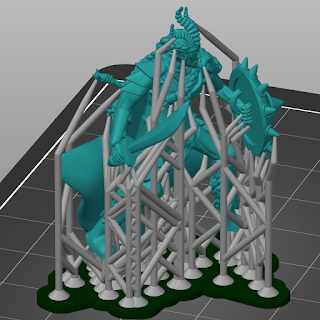
I've continued to play around with PrusaSlicer's support tree generation (for both MSLA and FDM prints ), and I'm starting to develop opinions about some of the settings.  So, I figured that I'd take a moment to write about the settings that I use to create trees that I like!  First, here's a screenshot of the trees that get generated with the default settings (after setting up my custom support points).  These are very robust trees, which is great for printing but less great for support removal.  When removing tree supports, I've found those diagonal bracings to be especially burdensome, as they make it much more difficult to "cut in to" the model to release the supports from it.  Fortunately, we can fix that by tweaking some settings, but you're going to need to go into Expert Mode  to get to them all.  So, in PrusaSlicer, go to Configuration -> Mode  and select Expert  to get them to show up. Firstly, we can tweak the Max pillar linki...

Using PrusaSlicer to Design Tree Supports for FDM Prints

Image
I've done a lot of work with tree supports in Meshmixer .  I don't want to denigrate the awesome utility that Meshmixer brings to the table, but it also hasn't been updated in two years.  Meanwhile, Prusa forked their version of Slic3r into PrusaSlicer and has added a bunch of support for MSLA printing... including tree supports!  And, they obviously paid a lot of attention to how tree supports are designed in tools like Meshmixer, because the PrusaSlicer interface neatly bypasses just about all of the pain points that I have when working with MM!  The one drawback is that the Tree Supports are only officially available for MSLA printers... but there's an easy way around that! In order to use PrusaSlicer to generate support trees, you need to change to one of their supported MSLA printers.  At that point, when you slice your model, it will automatically generate support trees that are tuned for that MSLA printer.  These automatically placed trees are a r...