Posts

Showing posts with the label Curve

Making Hair for a 3D Printed Character

Image
I've been focusing on making better looking character faces lately, because faces are hard!  Part of that has involved learning to make hair, too.  There are a ton of great tutorials out there for making faces , but most of the tutorials are geared towards visual arts, rather than 3D printing.  For the most part, that's actually fine, as a face for a 3D printed 32mm miniature doesn't need all of the detail that a face for a 3D rendered character would have, but it certainly doesn't hurt to add in extra detail! Hair can be another matter though.  I've read/watched a lot of hair tutorials and there seem to be a few different techniques that are popular. The first is really only useful to visual artists, which is to use the Particle system in Blender to make the hair.  This works great for rendering things on screen because you can make thousands of hairs and then style them as needed, but it doesn't work too well for 3D printing.  I have used versions ...

Making Tentacular Horrors!

Image
I love making tentacular horrors in Blender.  Through the use of a few relatively simple curves, you can easily make complex, tentacled monsters, which is really fun!  Using this method, a tentacle will be made up of 3 parts: A Circle that defines the cross-section of the tentacle (called the Bevel in blender) A Curve that defines the Taper of the tentacle A Curve that defines the pose of the tentacle First, I like to start with the cross-section circle.  To make this, I just press Shift-A  then go to Curve -> Circle  to make myself a nice round circle.  If we want this tentacle to be malformed in some way, we can edit that circle, but for now, let's just keep it round. Next, I make the taper curve.  You can use either a Bezier Curve or a Nurbs Path for this and I'll bounce back and forth between the two depending on how complex I want the taper to be or just how I feel like manipulating the controls for the curve.  When I'm making ...

New Thing: Giant Viper

Image
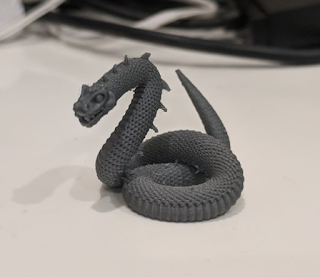
I made a Giant Viper Gloomhaven monster , and it was really fun!  This was a great chance to take the skills that I learned while making my Living Bones model , add to them, and then apply them!  But first, here's a picture of my version 1 print: Here's the crazy thing about that model - it was really easy to make.  Of course, I had no idea that it would be easy when I started, so the first thing that I did was a bunch of research about how to draw scales with Blender.  It was a bit of a challenging search because the scale function is so important while making 3D models, but I eventually came across the idea to use the Array and Curve modifiers, then found a great video about how to use them.  Thank goodness that I found that video, because they are not easy to use because of how sensitive they are to each object's position relative to its origin.  But, more on that later. Once I knew that I was going to try and make this snake as parametricly as p...