Posts

New Thing: Trees for Gloomhaven

Image
Painting this is definitely a problem for future Jason. I made another thing!  This time, it's a tree for the boardgame, Gloomhaven .  In the game, the tree takes up 3 hexes, so I made a nice large base to clearly represent that.  Once again, I based it on Terrain4Print's Vegetation Pack , using the oak tree trunk and arranging a bunch of the branches.  Then, I took the leaf clusters from my Gloomhaven bush model and decorated those branches. Once again, it's a real challenge to print.  The tree is larger and denser than the bush, so it requires even more support and is even harder to get at that support because of how intertwined it is with the tree's branches.  I thickened up those branches a fair amount, in an attempt at making them stronger, but I still lost a few branches and leaf clusters while trimming off the supports during my first couple of prints.  In the end, the tree looks fine, and now I suppose that I just have 3 unique trees ins...

New Thing: Bushes for Gloomhaven

Image
I published a new thing on Thingiverse - a Gloomhaven bush model !  I spent a lot of time trying to get decent looking foliage for my printed upgrades.  I tried printing the big blob style bushes and then painting them green, but I'm not nearly a skilled enough painter to pull that one off.  I tried printing a framework and then attaching clump foliage (basically, green dyed scraps of sponge) to it, but I'm nowhere near gentle enough to make that work (I tried everything I could think of to get that stuff to really stick together, but it was always shedding whenever I moved it).  So, I bit the bullet and decided that I would make my own bush, with actual geometry for the leaves. I'm still pretty new to 3d modeling, but I've watched a few of Miguel Zavala's youtube videos  and have managed to pick up a thing or two.  So, I used those hard earned skills and slaved away with Blender ... and made a leaf.  But that's ok!  Because, once I had a leaf...

Using Fusion 360 to Design and then Print a Box Insert for Better Organization

Image
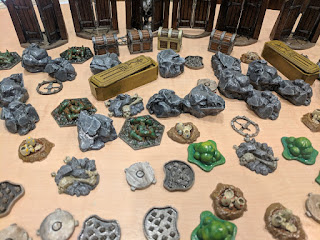
I've made a lot of terrain pieces for Gloomhaven since I got my 3D printer, and I recently crossed that critical threshold where I can't just keep them all in a single box anymore.  I was spending too much time rooting around in the box for the pieces that I wanted, so I figured that it was time to upgrade to some kind of tackle box or craft storage box or something.  Just as I came to this realization, I noticed a post on the Gloomhaven subreddit about a craft store running a big discount on storage boxes.  When there's food on my plate, you don't have to tell me to eat! After picking up a few storage boxes, I went about sorting my pieces.  I decided to put them into a fairly large box that had removable dividers along the rows, which worked out pretty well... except that I ended up using almost every cell in the box.  I had to remove a bunch of dividers for the doors and the boulders and the cave stone pillars (which aren't even in that picture!), but the ce...

Why Use Trapezoids as Keys When Cutting a Model?

Image
In my model cutting for 3d printing post, I mentioned that I like to use trapezoids for alignment keys.  Why is that?  6 axial alignment, bro. Ok, that phrase is a bit ridiculous, but when I took notes on my concept for this post, that's all I wrote down... and it's kindof true.  An isosceles trapezoid gives you keying on all 6 axes, whereas most other simple shapes (like squares, rectangles or circles) generally only provide absolute positions on 5 of them.  What am I talking about, when I mention 5 vs. 6 axes? Do you remember when the PS3 came out with its new Sixaxis controller?  At the time, I scoffed, thinking that we live in a 3 dimensional world and so there are only 3 axes, commonly called X, Y, and Z.  Therefore, this whole "six axis" thing was obviously just a marketing gimmick meant to make it sound more high tech.  Well, younger me was certainly wrong about that! I was  right that there are only 3 axes, but what I didn't think a...

Save Time and Filament - Always Preview your Print!

Image
All of the major slicing programs offer some sort of print preview feature, where you can examine the individual layers of the print.  This is a crucial functionality - I can't even count the number of catastrophic errors that I've caught by looking at that preview.  For example, today I downloaded some tree stumps off of thingiverse.  They looked great and would be super easy to print (nice big footprint, no meaningful overhangs, relatively short), so I loaded one up in Slic3r, sliced them, then transferred the gcode to my 3d printer to get things going. While my printer was heating up, I decided to check out the preview... and a major problem pretty immediately jumped out at me.  Unbeknownst to me, these tree stumps had tiny little protrusions reaching a few fractions of a millimeter downwards.  I didn't notice them when I was looking at the model, but it caused Slic3r to "hover" the bulk of each stump about .2 mm above the printer bed. So, I stopped the p...

Prusa MK3 Stringing at .05 mm Layer Height Resolved!

Image
I've had a Prusa MK3 for several weeks and have printed nearly a kilogram of upgrades for my boardgames.  Most of that has been terrain features, which have printed beautifully at 0.1 mm layer height (check out the things I've made for some examples).  Sure, the print lines are visible (especially after applying a wash), but I'm still very happy with the results.  I haven't been so happy with attempts at printing miniatures at 0.05 mm layer height. I was vexed to find that 0.05 mm layer height prints on my brand new printer looked like garbage.  They were so covered with strings that I couldn't even remove the support material.  Admittedly, they'd be pretty awesome if I exclusively played campaigns in the Mirkwood, but that's really not what I'm going for. I tried all sorts of things to resolve the situation, and some certainly helped.  I lowered my nozzle temperature from 210 to 200 degrees.  I adjusted my printing speeds so that they'd max ...

Getting Started with 3D Printed Minis, Part 4: Cutting Basics

Image
One of my coworkers asked me to print a Naruto styled Kunai for a shadow box for his son.  We hit up Thingiverse and found that model, which he liked, so I told him that it would be no problem to print.  And it wasn't, because I have the tools to cut the model to make it no problem to print. First, let's think about what I'd get if I decided to print that kunai as-is.  It's got that nice rounded handle and a tapered blade, so there's barely any contact with the print bed.  If I just tried to print it, I'd get a few mm2 of well adhered plastic on the bed, then a fair amount of spaghetti to either side of it as the printer tries to print in thin air. Obviously, that won't work, but we can set up supports and even rafting!  The raft will cause the printer to print the kunai's silhouette on the bed, then print up from there.  That'll give me great bed adhesion, and then it'll print support material as needed to print the curved and tapered p...