Posts

Showing posts with the label Scythe

New Thing: Scythe Victory Token and Upgraded Power Token

Image
After I finished my  Popularity Token  for Scythe, I decided that I should move on to the Victory Token to round out the collection.  I knew that I wanted a 3D tapered star, which put me into the same situation as I was in with the 3D rounded heart - it would be both difficult to print and impossible to set up nicely on the board.  So, it seemed only reasonable that I should use the same solution! So, I grabbed the ribbon from the Popularity Token and then set out to make the star.  The star was actually super easy to make - I just hit shift-a  and selected Mesh -> Circle  and then gave the circle 10 sides.  With that circle in place, I went into Edit  mode and selected every-other vertex, then pressed s  and scaled them down.  That pulled them inwards, leaving me with a great looking star outline.  Next, it was time to add the 3D elements. I selected the whole thing and pressed f  to make a face.  Then,...
New Thing: Scythe Popularity Token

Image
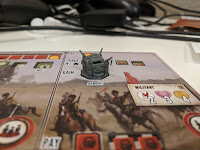
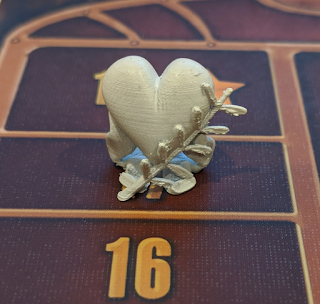
I was very happy with the way the Scythe Power Tokens looked on the board, so I decided to round out my component upgrades with improved Popularity and Victory tokens as well!  I started with the Popularity tokens , which ended up looking pretty cool, too! The first thing that I did was to make a heart.  I tried using the same Bezier curve technique that I used on the Power Tokens, but it didn't work out too well.  I made a decent enough looking heart and then was able to extrude it... but I wanted a smooth rounded heart, like you'd see in a Nintendo game, rather than a flat extrusion.  I'd been imagining that a Subdivision Surface  modifier would create that effect, and it sortof did... but it also left all sorts of crazy artifacts around the edges that looked really bad.  So, I tried again. This time, I tried a good old fashioned extruded cube with the Subvision Surface  modifier on it.  To make my life easier, I moved one side's vertices to...

New Thing: Scythe Power Token

Image
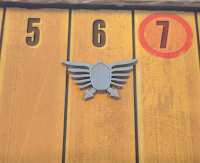
I recently picked up a Scythe expansion and, due to a packaging error, received 2 Wind Mills for one of the factions... but no Power Token!  Not exactly the end of the world, but certainly a good push to design my own Power Token replacement (which I had been thinking about doing, regardless).  So, that's what I did! It was a very simple process, actually.  I started by doing a quick google image search for the Scythe board, looking for a high resolution image of the victory track (since I know that it has a clear and moderately large image of the power icon).  I eventually found a good photo in an Ars Technica Review , which is cropped here. Next, I opened up Inkscape , which has been my favorite art program for years (although Blender might be surpassing it...) and imported that image.  Then, I drew a Bezier curve over half of it (my intent was to mirror it when I imported it into Blender, which gave me this result. I wasn't super happy with the result ...

New Things: Monument and Armory for Scythe

Image
My 3D modelling has gotten ahead of my blog posting, so this one's going to be a two-fer!  I recently uploaded the last 2 buildings for Scythe : the Monument and the Armory . These two designs were made in opposite manners.  I built the Monument almost entirely in Fusion 360, whereas the Armory came out of Blender.  I probably should have made the Armory in Fusion 360 as well, since it's entirely a building with simple angles, but it just didn't work out that way while I was working on it.  After I finished modelling the monument, I had no idea how to even represent the armory, so I spent some time on Google and various forums and was using Blender to sketch out various shape ideas, and the castle shape just started working well, so I ran with it. Why use one versus the other?  Fusion 360 uses parametric design.  That is to say, you specify a bunch of parameters and it will interpret all of those parameters to make a shape.  For example, a simp...

New Thing: Mine for Scythe

Image
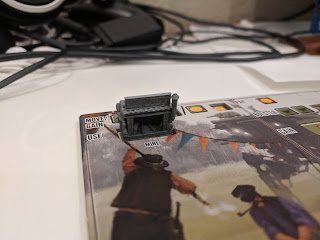
I've been working on 3D models for all of the Scythe buildings and recently uploaded the Mine Entrance to Thingiverse.  This was a challenging model for me to make, which meant that it ended up being a lot of fun. The first issue that I had was in figuring out just how to represent a mine entrance on the 19 mm x 10 mm footprint that I had to work in (so that it would still fit in the cutout on the board).  I live in Northern California, so I've seen Gold Rush Era Mine Entrances all my life.  So, I figured that my task was to take that kind of "large timbers holding up a cross-piece" common image and reimagine it in terms of diesel-punk Eastern-Europe, all while fitting within that little footprint. I started by taking the default Blender cube, and scaling it so that it would be 19 x 10 units (deciding that each unit in Blender would be 1 mm IRL), so that I could get a look at my footprint.  Then, I figured that I was going to need a kind of rock surface on 3 f...

New Thing: Windmill for Scythe

Image
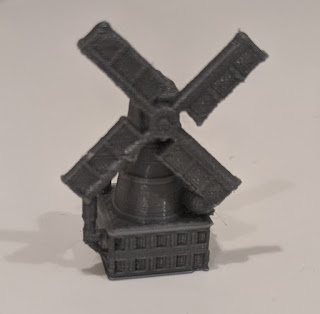
I recently finished printing upgrades for all of the overlay tiles in Gloomhaven, so I decided that it was time to take on another board game project.  A couple of years ago, I bought the Scythe component upgrade bundle from Meeplesource (which is arguably what set me down this whole path of 3D printing board game upgrades).  I love getting to play the game with the upgrade resource tokens and metal coins, but there's one additional set of components that I feel could still use some love: the buildings. The upgrade kit doesn't replace any of the wooden components that go on the player boards, which is mostly fine, as they are mostly simple shapes to represent abstract concepts.  Mostly.  Each player has 4 buildings that they can build: the Mill, the Mine, the Monument, and the Munitions Depot (big fan of alliteration).  The game comes with little wooden blocks that vaguely represent each of those buildings that sit in slots on the player boards until they are...