Posts

Tweaking Support Pads for FDM Printing

Image
When running an SLA print, the standard practice is to use a Pad, which is basically a few solid layers of very well cured resin, then have the model suspended above it on trees.  This solid pad helps ensure bed adhesion, and probably does some other important functions that I haven't even considered... but we don't necessarily need it if we're doing an FDM print.  In fact, if our model has a flat bottom, it can be really nice to have it directly on the print bed instead of floating above it! Fortunately, we can tweak the support pad in order to behave in exactly this way!  The first thing that you'll want to do is open PrusaSlicer (with an SLA printer selected), then go to Print Settings  tab and open the Pad  section.  Start out by enabling the Pad Around Object  option.  That will enable the basic "halo pad" but we're going to want to tweak a few of these other settings for our FDM printers.  The first one is the Pad Wall Thickness ....
Tweaking PrusaSlicer Support Tree Settings

Image
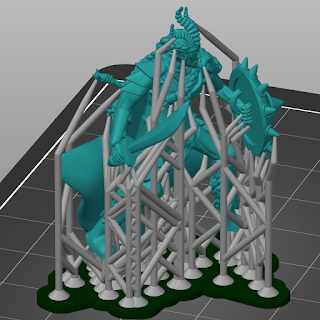
I've continued to play around with PrusaSlicer's support tree generation (for both MSLA and FDM prints ), and I'm starting to develop opinions about some of the settings.  So, I figured that I'd take a moment to write about the settings that I use to create trees that I like!  First, here's a screenshot of the trees that get generated with the default settings (after setting up my custom support points).  These are very robust trees, which is great for printing but less great for support removal.  When removing tree supports, I've found those diagonal bracings to be especially burdensome, as they make it much more difficult to "cut in to" the model to release the supports from it.  Fortunately, we can fix that by tweaking some settings, but you're going to need to go into Expert Mode  to get to them all.  So, in PrusaSlicer, go to Configuration -> Mode  and select Expert  to get them to show up. Firstly, we can tweak the Max pillar linki...

Using PrusaSlicer to Design Tree Supports for FDM Prints

Image
I've done a lot of work with tree supports in Meshmixer .  I don't want to denigrate the awesome utility that Meshmixer brings to the table, but it also hasn't been updated in two years.  Meanwhile, Prusa forked their version of Slic3r into PrusaSlicer and has added a bunch of support for MSLA printing... including tree supports!  And, they obviously paid a lot of attention to how tree supports are designed in tools like Meshmixer, because the PrusaSlicer interface neatly bypasses just about all of the pain points that I have when working with MM!  The one drawback is that the Tree Supports are only officially available for MSLA printers... but there's an easy way around that! In order to use PrusaSlicer to generate support trees, you need to change to one of their supported MSLA printers.  At that point, when you slice your model, it will automatically generate support trees that are tuned for that MSLA printer.  These automatically placed trees are a r...

Building Buildings

Image
I've been working on my King of Tokyo proxy models for a while now, which has meant that I've needed a bunch of buildings to put onto the bases for the various Kaiju to rampage through.  Rather than building each of these buildings by hand, I put together a system of arrays to do it for me.  Since I'm rather proud of how it all comes together, I figure that I should go ahead and write about it here! So, let's talk about how it all works.  First, here's the meat of the "city building" collection that I use (for those of you on the Patreon, that's the actual name of the collection where I keep all of this stuff in my King of Tokyo files, if you want to look at it in Blender).  As you can see, there are several partial buildings there, as well as some random bits on the right.  It's a bit harder to see, but directly in front of the left-most building, there are three bezier curves (although each is a straight line), running parallel to the world axe...

RPG Map Assets: Diner Booth and Stool

Image
This is a bit outside my normal topic range on this blog, but I wanted to share these images with the community and this seems like the best place to do it!  In addition to my love of 3D printing, I love playing tabletop RPGs.  When we play, my group typically uses a virtual tabletop , as we've been playing for far longer than I've been doing 3D printing! Anyway, I'm running a game set in a modern setting at the moment and want to run a combat that's going to start in a 50's style diner.  I couldn't find any good art assets for the diner booth, but I thought to myself, "I've learnt a fair amount of about using Blender... maybe I can whip something up real fast."  So, I did! Admittedly, these aren't the most detailed art assets ever... but they get the point across!  And, since I wasn't able to find anything like this when I was searching, I figured that I should post them here in case anyone else would like them.  So, here's my dine...

Making Chainmail in Blender

Image
Hi everyone - this week I came across an awesome technique for making repeating patterns on a mesh in Blender.  Given that I'm currently working on an armored headless horseman model, this struck me as the perfect way to make some chainmail.  Check it out: This is cool because that chainmail is a repeating pattern of intersecting rings.  Well, it's specifically a repeating pattern of the intersections between a bunch of rings, but you get the point ;) So, how'd I turn that little chain intersection bit into a bunch of chainmail for my model?  I used the Tissue Addon , that's how!  I watched a great video by Default Cube on turning objects into woven baskets , and I thought to myself, 'this would work fantastically for chainmail!" So, first, what's the Tissue addon do?  Basically, you give it two meshes, call them a host mesh and an object mesh.  It then puts a copy of the object mesh onto every face of the host mesh.  So, in my case, I c...

Resin Printing First Impression!

Image
Hi everyone - I'm happy to announce that I'm the proud owner of a Prusa SL1 resin printer, meaning that I'm going to have a whole new set of 3D printing lessons to learn and then write about!  Since I just finished my first real resin print, I guess that this is an appropriate time to write about my first impressions, and specifically how resin printing on a Prusa SL1 differs from PLA printing on a Prusa MK3. The first and most apparent difference for me is the amount of effort that goes into a print.  When I want something on my MK3, I just plug in the SD card, wipe down the bed with IPA, then start the print.  I check on it every hour or so to make sure that nothing's gone terribly wrong, then a few hours later, I come back and turn off the machine, pop the object off of the bed, and remove the supports.  It's nice and simple.  Resin printing has a lot more process to go through. First, you double-check that everything's clean, then you measure out your re...